1. App description
AndroSensor started as a simple showcase of all the sensors your android device has, yet it has become the absolute all-in-one diagnostic tool that lets you know virtually everything about your device's status.

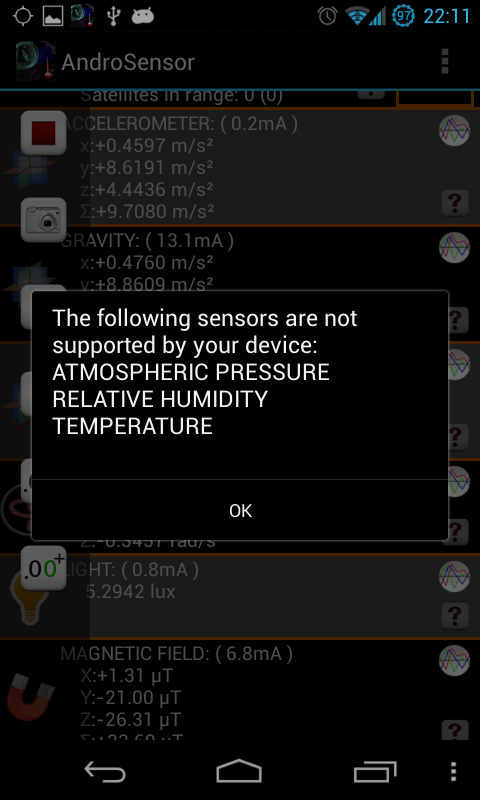
AndroSensor supports all the sensors an android device can have and it will tell you which of them is not supported by your hardware.
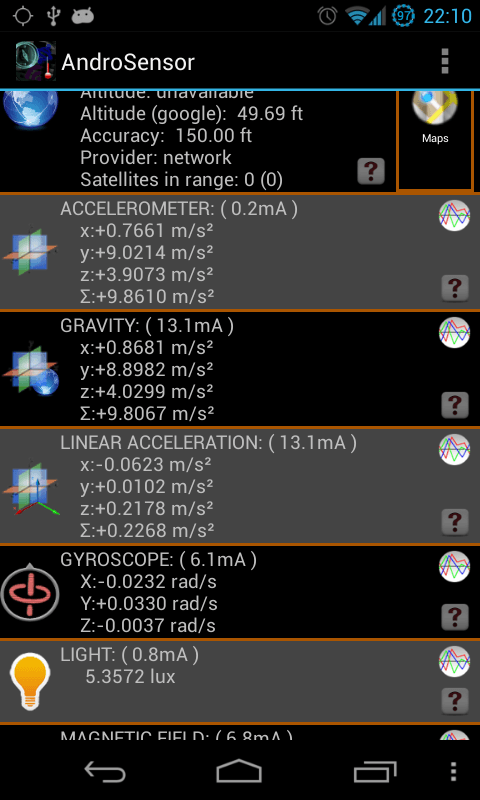
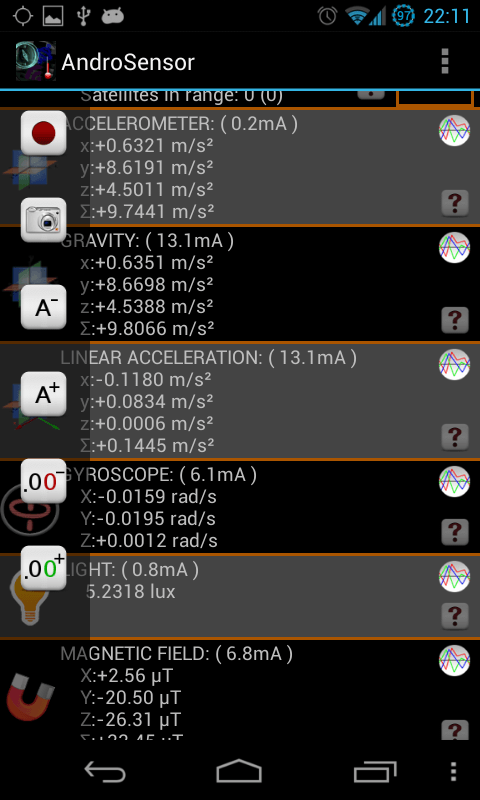
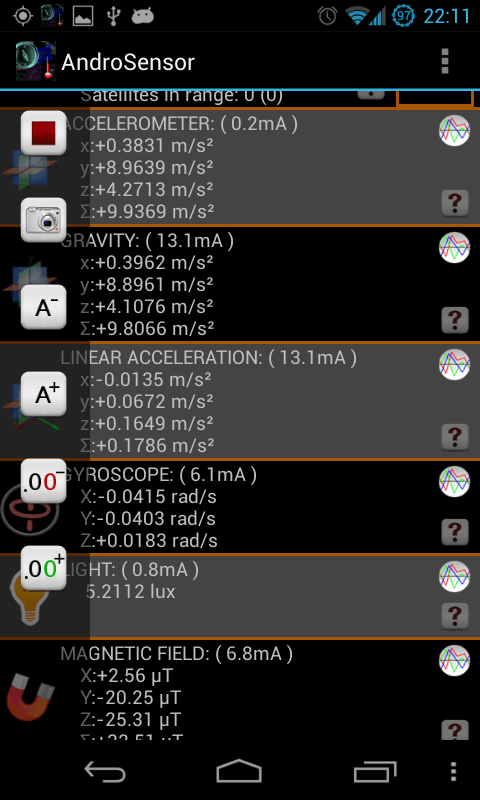
View in a single screen the data from all device's sensors in real time. Graphical and text output available for each sensor (graphs are not available for proximity, location and battery info):
- location, location provider, accuracy, altitude, speed and GPS NMEA data.
- Google maps to show the above info. Tapping on your location shows your address, postal code and location accuracy (if available)
- accelerometer readings, (incl. linear acceleration and gravity sensors)
- gyroscope readings,
- light sensor value,
- ambient magnetic field values,
- device orientation
- pressure sensor (barometer)
- relative humidity sensor
- proximity sensor readings
- temperature readings
- battery status, voltage, temperature and health
- sound level meter (decibel)
- If your device supports it, next to the sensor's name, you will see how much power the sensor consumes per hour in mA.
AndroSensor also allows you to record everything from your sensors into a CSV file.
*** If you like this app, please consider purchasing the donate key from Google Play Store. No extra functionalities, just no ads and a bit of support for me to continue producing better apps for android! ***

2.Features
Graphs (beta):
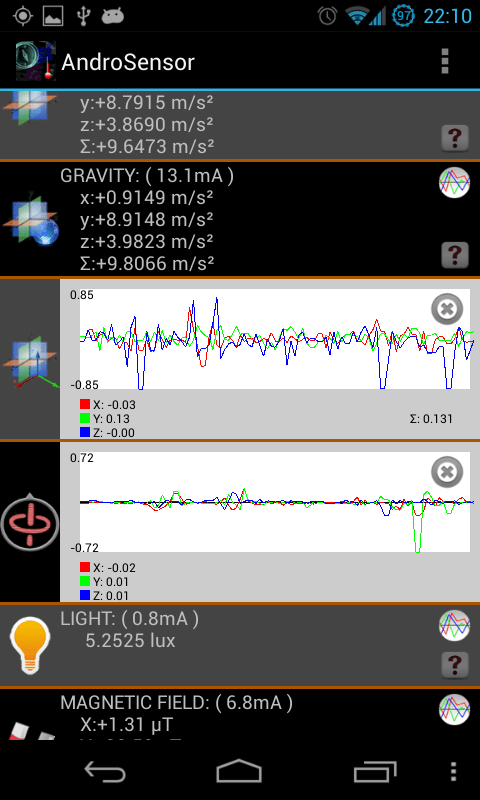
As of version 1.9 you may choose how you want values to be displayed, that is under real-time chart output or the good-old text layout. You may switch between graph and text output for each sensor by tapping on the sensor image on the left side. Images that can be tapped are distincted by an orange line on the left edge of the icon. Graphs are not available for Location and Proximity.
Recording:
Enable from settings and press the record button to start capturing sensor values as they happen. When you press again the recording stops and exports the readings to CSV file on your SD Card. Only visible sensors are captured. Recording will NOT be interrupted if you leave the main screen or if you manually turn the screen off. As of version 1.9.2, there is no limit of CSV file length and AndroSensor can be pushed to the background while it is recording data.
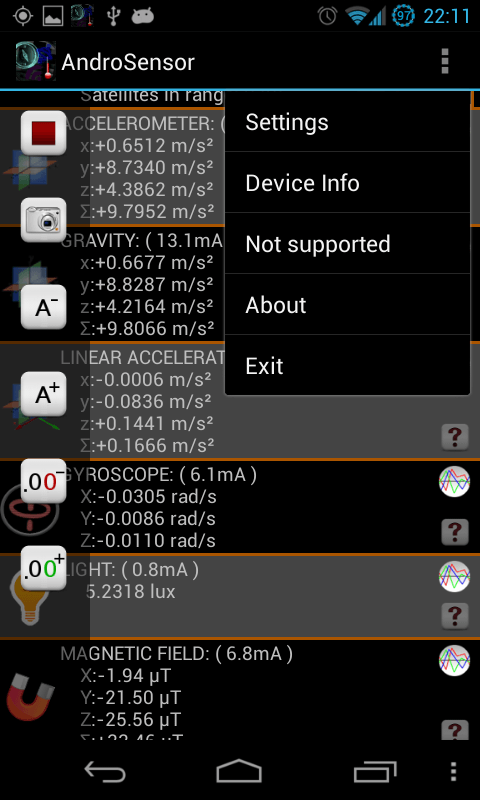
Press MENU to toggle settings, see device info, system log file or a list of sensors that are unavailable for your device.
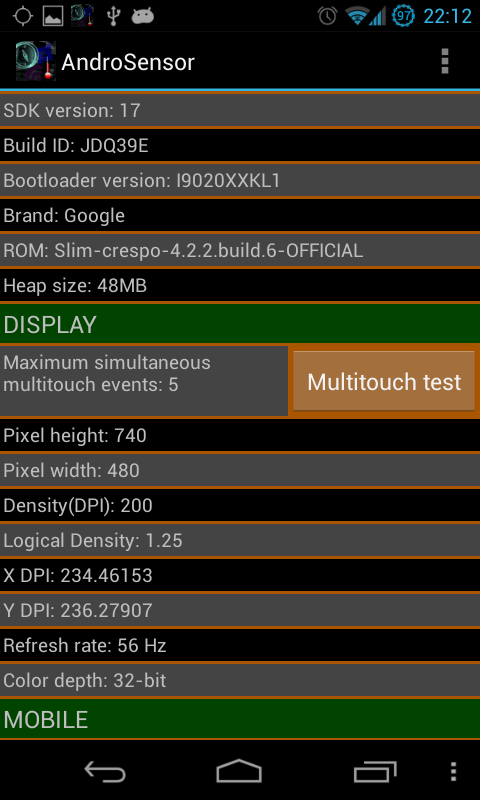
- Device info gathers as much as it can and prints it out in a simple and easy-to-read view. Mobile signal strength, wifi info, CPU architecture, available and total RAM, internal and external memory, display metrics, OpenGLES version and kernel version are a small part of the information displayed. Clicking on a line copies it's content to clipboard.
- Log view prints out the last ~100 lines of the device system log file, as in logcat. Saving or mailing the log will give you access to the full log file. To enable Logview you need to download the "AndroSensor Log Collector" addon.
- Androsensor never runs in background (unless of course you start CSV recording), so it does not consume battery while you don't use it.
- Supports Apps2SD.
- Enabled for Honeycomb, ICS and tablets.
- 19 Languages supported: English, Greek, Italian, Russian, Spanish, French, German, Hungarian, Portuguese, Romanian, Chinese, Dutch, Swedish, Turkish, Korean, Czech, Polish, Vietnamese, Ukrainian
* Please be encouraged to email me at fivasim (at) gmail.com if you wish to report a bug, suggest an improvement, request a translation to be added or if you just have a question about the app.
*Ads by AdMob
3.Notes
* NO KIND OF DATA is collected. Network permission is required only for the network location service to display and for the ads (Privacy Policy).
* Total RAM size shown might be lower than device specs since an amount of memory is bound by the android system (usually 96MB or so)
* GPS altitude does not take into consideration earth's abnormal shape so GPS altitude and google API altitude may differ by up to 50 meters (150 feet).
* Due to compatibility issues the Device Info screen is not available on android 1.6 (Donut).
* Some sensors need to be triggered by an event before they get activated. If light or proximity sensor are "Waiting for event..." , try throwing some extra light on your device to "wake up" the light sensor, and try moving your hand over your device (without touching it) to "wake up" the proximity sensor.
* If the app crashes after an update try uninstalling and reinstalling.
* Bugs will be fixed ASAP if you report them.
4.Permissions required
Note: All permissions required by androsensor are used only to show the info that can be retrieved by the Android system regarding your device. No kind of data is collected under any circumstances and no tampering of your device is attempted. Androsensor is a diagnostic tool and a showcase of your device's features and values... and nothing more. Here's a short explanation of the permissions required by Androsensor as shown on the Android Market:
Hardware controls
- record audio ("android . permission . RECORD_AUDIO") : required for activation of the microphone to measure sound level.
Your location
- fine (GPS) location ("android . permission . ACCESS_FINE_LOCATION") : required for getting location to test the functionality of device's GPS.
- coarse (network-based) location ("android . permission . ACCESS_COARSE_LOCATION") : required for getting location to test the functionality of device's network location values.
* No location data is collected (not even for the ads).
Network communication
- full Internet access ("android . permission . INTERNET") : It is required for the ads, the network based location and for the google maps and the geocoder to work. Geocoder is the function that uses Google API to convert a location to a physical address. You may test this if you tap on your location on Androsensor's map. Also, Internet access is used to retrieve external IP by making a simple GET request to http://fivasim.pcriot.com/ip.php.
Phone calls
- read phone state and identity ("android . permission . READ_PHONE_STATE") : It is required by the "Device Info" view. Among others it retrieves phone IMEI code, serial number, SIM card status-health and SIM serial number. This permission also gives access to an incoming phone call information (only if the call is active, not call history) but this feature is not and will never be used by this app.
Storage
- modify/delete USB storage contents modify/delete SD card contents ("android . permission . WRITE_EXTERNAL_STORAGE") : It is required by the "Snapshot" and "Save Log to SD" feature. Gives permission to write only on SD Card / External storage and not internal storage or apps in sdcard. Files are saved for your own later use. Delete possibility is not and will never be used by this app.
Network communication
- view Wi-Fi state ("android . permission . ACCESS_WIFI_STATE") : It is required by the "Device Info" view for showing wifi information and signal strength.
- view network state ("android . permission . ACCESS_NETWORK_STATE") : It is required by the "Device Info" view for showing mobile network information like operator, antennas in range and mobile signal strength.
Your personal information (Optional)
- read sensitive log data ("android . permission . READ_LOGS") : It is required for viewing device logs. All the logview does is execute shell command "logcat -d" and print the output (or save/email it if the users chooses to do so). It exists only if you download the "AndroSensor Log Collector" addon.
Receive text messages (SMS) (Optional)
- Receive SMS ("android . permission . RECEIVE_SMS") : It is required for using sending commands to AndroSensor via SMS. This permission allows AndroSensor to intercept and read incoming SMS. It does not allow reading your old SMS messages. AndroSensor will ignore SMS messages that do not start with the word "AndroSensor" and will not store or tranmit your incoming messages. This permission exists only if you download the SMS Remote addon.
Prevent device from sleeping (Optional)
- Prevent device from sleeping ("android . permission . WAKE_LOCK") : It enables AndroSensor to acquire a WakeLock while the recording is active, ensuring that your device will never sleep while it is recording sensor data. The WakeLock is only used when AndroSensor is recording, not when it is active. On most devices, this addon is not necessary. This permission exists only if you download the "AndroSensor Keep Awake" addon.
5.Special thanks to:
- Andrea Brunetti ( email: b-andrea90 (at) hotmail.it ) and Christina for the Italian translation
- Andrey Moiseev for the Russian translation (Andrey's blog, Andrey's apps)
- Mikhail Sokolov for the Spanish translation
- Jean-Baptiste Lecomte for the French translation
- Bela Dora for the Hungarian translation
- Jorge Moojen for the Portuguese translation (Jorge's website)
- Vlad Vidican for the Romanian translation.
- Matei Miron for his help with the Romanian translation.
- Götz Ruhland for his help with the the German translation. (Götz's website)
- Mathias for the Dutch translation.
- Knutars for the Swedish translation.
- Emre for the Turkish translation.
- Gyoohwan Ko for the Korean translation.
- Petr for the Czech translation.
- Jacek for the Polish translation.
- Dong Hai Phuong Nguyen ( A.K.A. "Towardthesea", email: ph17dn (at) gmail.com ) for the Vietnamese translation.
- Andriy Bandura for the Ukrainian translation.
- Walt for his help with debugging.
- DRS David Soft - David Refoua for the awesome new icon!
- Everybody who has reported a bug or issue.
- Everybody who has rated or made a comment, regardless of how many stars.
*** Thank you! ***
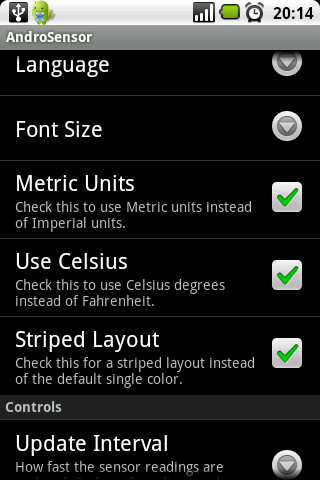
6. Screenshots:
7. The sensors
Many people don't know exactly what all of these values mean. So allow me to explain briefly what each sensor does:
Location: It shows your location with longitude and latitude, along with other values such as speed or elevation. Choosing the mapview will show you what these values mean on a map.
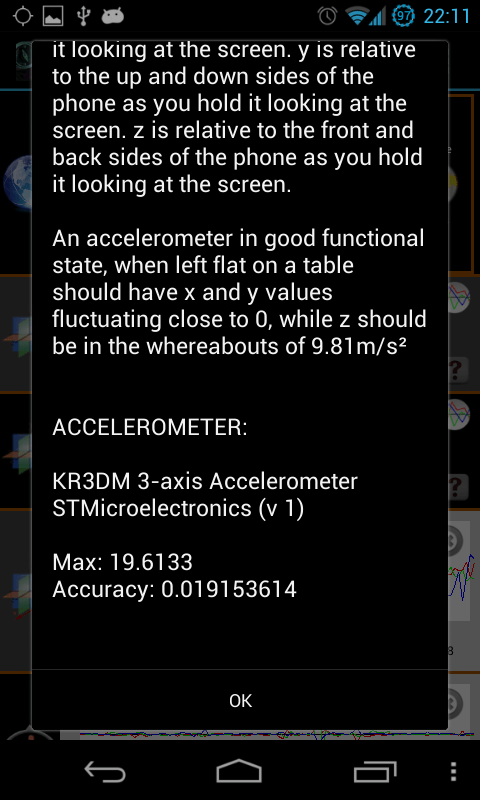
Accelerometer: It measures the amount of force applied on the device trying to force it to move. If you leave the phone flat on a table it will display the values of gravity's acceleration. If you move it around it shows in real time how much force is applied on it in the form of acceleration. The x,y and z axis show the direction of the force. x is relative to the left and right sides of the phone as you hold it looking at the screen. y is relative to the up and down sides of the phone as you hold it looking at the screen. z is relative to the front and back sides of the phone as you hold it looking at the screen.
Gravity: It shows the forces measured by the accelerometer that are caused by gravity. If the phone is still, the gravity sensor should have the same values as the accelerometer.
Linear acceleration: It shows the forces measured by the accelerometer that are not caused by gravity. If the phone is still, the linear acceleration values should be all 0.
Gyroscope: It is a little like the accelerometer but measures the rotation speed of the device and not acceleration. This is mostly required for games like 3D racing games and is available only on some of the most expensive devices.
Magnetic Field: Measures force in the 3-axis like the accelerometer but for magnetic forces. You can check this by bringing a magnet near the phone. If there is no magnet or large metal object nearby, it gives you the magnetic field of the earth. Units are uT (microTesla).
Orientation: Shows which way your phone is pointing at. X is relative to magnetic north pole (0 means your device's top points to the north pole, like a compass), y is relative to the ground (0 means phone is left flat, eg on a table... 90 means that phone is standing vertical) and z shows "roll", this is rotation around itself where 0 means phone is facing to the sky and 180 means the screen is facing the ground.
Light: Light sensor measures the intensity of light being thrown on your device. The light sensor is usually located near the earpiece of your device and is mostly used to adjust screen brightness according to the ambient light, so that the screen will be as clear as it can be while not tiring your eyes, or consuming excessive battery power.
Proximity: Proximity sensor checks whether there is some obstacle in a very close distance to your device (usually that would be your hand or your ear). The proximity sensor is usually located near the earpiece of your device and is mostly used to automatically turn the screen off while you are in a call and you bring the phone to your ear, so that you don't accidentally press your screen and mess with the call. Proximity sensor has a very small radius, it detects movement in a short distance varying between 0.5 cm and a couple of inches ( actual values depend on device ).
Pressure: Pressure sensor measures the atmosphaeric pressure in your location. It is actually a barometer for the devices that have one, which are very few currently. The pressure sensor can be used as a normal barometer (which is to predict the weather), but it also helps for more accurate calculation of your elevation/altitude, at which GPS can be off by unacceptable amounts.
Temperature: Ambient temperature value. This is different from battery temperature. This sensor is deprecated in newer versions of android OS and may not work on certain devices, even if it exists.
Relative Humidity: Relative ambient air humidity in percent. (from Wikipedia): Relative humidity is a term used to describe the amount of water vapor in a mixture of air and water vapor. It is defined as the ratio of the partial pressure of water vapor in the air-water mixture to the saturated vapor pressure of water at the prescribed temperature. At a relative humidity of 100 percent, liquid water at the same temperature as the air will no longer evaporate. A relative humidity of 0 percent means that no water vapor is present. Relative humidity is often used instead of absolute humidity in situations where the rate of water evaporation is important, as it takes into account the variation in saturated vapor pressure.
Battery: Not really a sensor, but a message broadcasted by the android system every time a change is detected in the status of the battery.
Sound: Measures the intensity of sound that the phone's microphone receives. It is not very accurate and needs calibration (from Preferences) on each device, but can give you a good idea of:
- how loud a place is when compared to someplace else.
- how well your microphone works and what kind of sounds it is able to intercept.
* The microphones of android devices are designed to capture normal speech and dismiss any other sound. No phone or tablet can be used to substitute professional equipment for this usage. Do not rely on this reading if your hearing is at stake.
8. Reading AndroSensor's CSV data from sensor
AndroSensor has the ability to record sensor data and export it to a CSV file. This file is saved in your device's SD card (or external memory) in a folder named AndroSensor. When the recording is finished a popup notification appears to tell you the name of the CSV file. The format is "Sensor_record_<dateTime in ISO format>_AndroSensor.csv" (no brackets).
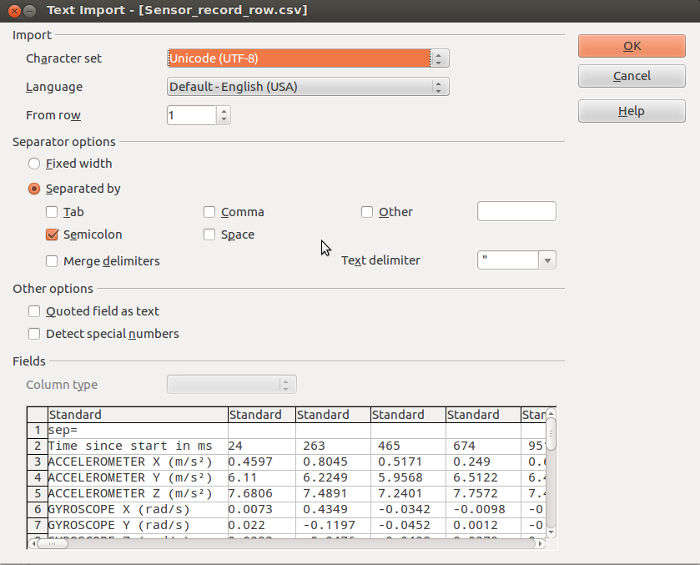
You may transfer the CSV file to your PC and open it with a spreadsheet program like Microsoft Excel or LibreOffice Calc. When you open the file you will be prompted on how you want the program to parse the file for best readability. Below is a screenshot on how to configure it. The screenshot is taken from OpenOffice Spreadsheet, but the same settings apply for Microsoft Excel and LibreOffice Calc.
9. AndroSensor addons
"AndroSensor SMS Remote" is an addon for AndroSensor. With this addon installed, you can command AndroSensor to start/stop recording by sending a simple SMS message to the target device.
How to use:
Available commands are currently only start and stop. More options and possible more commands will be added in the future. With "AndroSensor SMS Remote" installed, just send to the device that you want to control an SMS with text "ANDROSENSOR <command>" (<command> is replaced with one of the commands listed below).
Available Commands:
- "START <interval> <duration>" : Starts the sensor recording into CSV file. Parameters <interval> <duration> are both numeric, both optional but must be specified in this order. Interval overwrites the value of "Recording interval" setting in AndroSensor's settings. Duration, if set specifies how long the recording will be (in seconds).
Example SMS:
"ANDROSENSOR START" : Recording starts. It will not stop unless you manually stop it or send the STOP command via SMS (or it crashes :)
"ANDROSENSOR START 1.23" : Recording starts and values will be recorded every 1.23 seconds. It will not stop unless you manually stop it or send the STOP command via SMS (or it crashes :)
"ANDROSENSOR START 1 3600" : Recording starts and values will be recorded every 1 second. The recording will stop automatically after 1 hour ( = 3600 seconds).
"ANDROSENSOR START 0 3600" : Recording starts. The recording will stop automatically after 1 hour ( = 3600 seconds). The recording interval value is not changed (whatever value you have set in the app, will be used for this recording).
"ANDROSENSOR START 0 0" : Same as "ANDROSENSOR START" zeros are ignored).
- "STOP" : Stops the sensor recording and saves the CSV file. If set in AndroSensor's settings and an internet connection is available, it will also send the saved CSV file to the configured email address(es).
ATTENTION: The word ANDROSENSOR must be the first word, else the SMS is ignored. To command AndroSensor to start recording, the message must be "ANDROSENSOR START".
Please note that the automatic email sending is in beta. There is also a file size limit of 9 MB (zipped). If the sending fails for any reason, it will not be retried. All emails are send from address "androsensor ( at ) fivasim ( dot ) com", so please make sure that it doesn't get in your spam list.
Some Q&A:
Question: Why is this necessary?
LogView prints out the last ~150 lines of the device system log file, as in logcat.
It also provides and option to save the log in your external memory / SD card, or even mail it as an attachment to anyone you wish. Saving or mailing the log will give you access to the full log file (usually more than 4K lines).
* The LogView requires READ_LOGS permission which is under "Personal Information" category. This is not looking to get your personal info. It's just that the read logs permission is in the general category of "Personal Information" permissions.
This addon contains the required permission and the code to show the log file in AndroSensor. It doesn't do anything if you don't have AndroSensor installed.
This app is a key to remove the ads from AndroSensor free app. It permanently removes the ads from AndroSensor and you still get the updates from the android market. This is not a standalone app. It requires AndroSensor free version to work.
If you accidentally delete the Donate Key, or if you do a factory reset of your Android, you may download this key again anytime with no additional charge.
10. Autosend email, Shortcuts and More (AndroSensor version 1.9.6 and later):
When sensor recording is finished, AndroSensor can send the CSV file as attachment via email. To enable this feature, you must go to AndroSensor's settings, enable "Email CSV" checbox and add your email in the "Email CSV to" field. You may add more than one emails separated with commas.
To achieve automatic email, AndroSensor uploads the CSV file to a script on www.fivasim.com, the file is received by a php file which sends an email from "androsensor ( at ) fivasim ( dot ) com" and deletes the local file, so the file is not stored.
Limitations:
The fivasim.com domain, web server and emails are handled by a Raspberry Pi running raspbian in my home. My internet connection is a mere DSL line with 1Mbps upload rate. Given the Pi's low power and the restrictions imposed by running a 35$ server at home, there is absolutely no guarantee that the upload will succeed and that the mail will be delivered. Also, my internet connection may drop, no backup power supplies so the server is prone to blackouts and of course my little Pi might not be able to handle all the traffic if it comes too much. As of version 1.9.6.1 (available only for android version 4.0+), AndroSensor will retry to upload a CSV file every time it is started, if an upload has failed.
The maximum CSV file size is set to 9MB (limitation by internet provider).
Also, as of version 1.9.6.1 of AndroSensor, the CSV file will be zipped by the android device before uploading, allowing much larger files to be sent (about 100MB).
The domain fivasim.com is based on dynamic DNS, which means that sometime it could have been used by an IP recently used by a spammer. Mails from androsensor ( at ) fivasim ( dot ) com are legit, but may not be considered as such by your mail provider. If possible, add a filter to allow emails from androsensor ( at ) fivasim ( dot ) com. If you use gmail, yahoo or similar, just add "androsensor ( at ) fivasim ( dot ) com" to your contacts so that your email won't end up in your spam folder.
Do not attempt to reply to androsensor ( at ) fivasim ( dot ) com. This is an address that does not accept emails. Use fivasim ( at ) gmail ( dot ) com if you need help with AndroSensor.
AndroSensor supports the creation of home screen shortcuts for starting or stopping sensor recording. Just long press in a blank space on your home screen, select "Add shorcut" (each launcher has different menus to add shortcut, I suppose you know how to add shortcuts to yours) and select "AndroSensor Start Recording" or "AndroSensor Stop Recording". Now with these shortcuts, you can start/stop recording without opening AndroSensor.
As of version 1.9.6.2, AndroSensor provides calculation of altitude using atomespheric pressure sensor.
To enable, you must go to AndroSensor's settings and edit the "Barometer Altitude" preference.
The available options are:
1) Disabled
2) Sea-level pressure from webservice.
This option contacts a webservice with your longitude and latitude to retrieve local weather information. The webservice is provided by openweathermap.org. Given the atmospheric pressure at sea-level, and your the pressure reading of your android, it is possible to calculate your current altitude with great precision. The accuracy of the altitude calculations depends mostly on the data of the API and will be of very good quality in most big cities around the world. All data transferred is completely anonymous.
3) Current height to zero (height diff mode)
This mode calculates the difference in altitude since the time of starting AndroSensor. Current atmospheric pressure is matched to height of 0, and changes in pressure are shown as changes in height as well. No webservice is contacted for this option.
4) Sea level pressure fixed 1013hpa
This modes sets the pressure at sea level at 1013hpa and calculates your altitude accordingly. 1013hpa is a very common value and at normal weather will be quite close to the actual sea level pressure.
Important note - disclaimer: The calculation of altitude using the barometer of an android device is not sufficient to cover for the lack of professional equipment when making measurements whose accuracy is of great importance.
AndroSensor now supports starting or stopping sensor recording with:
- Tasker tasks
- Locale
(and maybe more apps like the above, help me enhance this list).
For Tasker and Locale, you will also need the "AutoShortcut" app which allows the use of shortcuts in those apps. Just use the AutoShortcut addon and select the appropriate shortcut ("AndroSensor Start Recording" or "AndroSensor Stop Recording") for your task.
11. Links / Reviews about AndroSensor
- AndroSensor reviewed at TalkAndroid
- AndroSensor reviewed by Android app review source
- AndroSensor reviewed at TechCular
- Παρουσίαση του AndroSensor απ το OSarena
- An interesting use of AndroSensor, recording a motorcycle ride from somebody who knows how to handle big amounts data. It'll be interesting to see what he comes up with. Good luck.

12. Changelog.
* Latest version of AndroSensor for devices running android 2.0 - 3.2 is 1.9.6.
* Latest version of AndroSensor for devices running android 1.0 - 1.6 is 1.9.4.4.
v1.9.6.3 (Jan 23, 2015) :
New features:
- Awesome new icon thanks to David from DRS Soft.
- Fast recording: small visual and stability improvements.
- Real time graph for battery temperature and level.
- Fix annoying crash after stopping and restarting the recording quickly.
- Extended SMS commands (only if you have the addon)
- Fast recording: small visual and stability improvements.
- Orientation values correctly marked as Z(azimuth) X(pitch) Y(roll), instead of X Y Z.
- Calls to openweathermap are less frequent (once per 30 minutes. *only when enabled).
- Fix a bug which (very rarely) caused wrong units to be displayed in CSV recordings
- Maximum recording interval extended to 15 minutes
- Fix a couple translations and typos
v1.9.6.2 (Nov 25, 2014) :
New features:
- Calculate altitude and/or difference of altitude using barometer readings. ( more info and instructions )
- Fast recording. It is now possible to record CSV data at up to 200Hz. Note that this feature is UNSTABLE. Especially if your device lacks the power, you can expect freezes, crashes and random reboots. If you need recording at high rates, enable only the sensors that interest you and disable the rest to reduce the load on your device. You have been forewarned.
- Timing of CSV recording and update interval of sensor values are much more accurate, according to your settings
Also, a couple bugfixes and improvements:
- Multitouch test attempted fix for irrational number of touch events.
- Graphs are updating at the same rate.
- Ability to dismiss battery information from the CSV. Just disable battery in AndroSensor's settings -> Enabled Sensors. The battery info will still be visible in the UI.
- Select CSV separator between comma (",") and semicolon (";"). Default is semicolon as it has been since the beginning.
v1.9.6.1 (Sep 20, 2014) :
- Starting with this version, further development of AndroSensor will support android OS version higher than 4.0.
* Latest version of AndroSensor for devices running android 2.0 - 3.2 is 1.9.6.
* Latest version of AndroSensor for devices running android 1.0 - 1.6 is 1.9.4.4.
- Increase size of Graphs. Tap on a graph to make it full screen, tap again to reduce to original size
- Sensor recordings are zipped before sending. Max size is still 9MB, but zipped, so actual size limit is about 100 MB
- Auto retry sending email with saved data, in case there was an error. This happens evry time AndroSensor is started.
- Acceleration in world coordinates, Longitude - Latitude expressed with minutes-seconds, kPa atmospheric pressure unit
- Removed the CSV file format option, as "Rows" is useless and buggy. "Columns" is enforced
- Updated link to donate key. It is now on Google Play Store
- GPS NMEA data are displayed in a better way on screen (with horizontal scrolling if the lines don't fit), and are correctly written in CSV (lines delimited with double colon "::").
- Fix a typo in the CSV header line.
- CSV includes GPS satellites: locked / in range.
- Charging / discharging rate of battery.
- Slow sensors (like Light, barometer etc) will have less values in graphs than faster sensors.
- Updated admob SDK
v1.9.6 (Nov 8, 2013) :
New features:
- Support for two new addons : "AndroSensor SMS Remote" and "AndroSensor Keep Awake"
- Add home screen shortcuts to Start/Stop recording.
- Start/Stop recording via Tasker tasks *
- Beta: Automatic send email of recorded file when recording stops
Also:
- Ukrainian translation thanks to Andriy Bandura.
- UI improvements, bugfixes and improvements
* Special thanks to Walt for his help.
v1.9.5.5 (Jul 21, 2013) :
- Added Vietnamese translation thanks to Dong Hai Phuong Nguyen.
- Another fix for the relative humidity (hopefully the last).
- Fix some rare force close issues in Settings and Mapview.
v1.9.5.4 (Jul 20, 2013) :
- Fix a relative humidity graph problem.
- Added hPa as default pressure unit (existing users must update settings manually)
- Fix a couple bugs with the CSV and a minor UI bug.
v1.9.5.3 (Jul 7, 2013) :
- Added two options in Settings: graph size and amount of values in graph
- Fix a bug which caused sound values not to be written in the CSV
v1.9.5.2 (Jun 17, 2013) :
(Mostly Bugfixes)
- Fix barometer units not changing
- Fix temperature and distance units not changing immediately (sometimes it required restarting the app)
- Further improve GPS update speed
- Fix missing newline in recorded CSV file
- Added a precise clock, since time is the fourth dimension :)
(Existing users can enable the clock in "Settings" -> "Active sensors")
v1.9.5.1 (Jun 17, 2013) :
-Fixed crashes
v1.9.5 (Jun 16, 2013) :
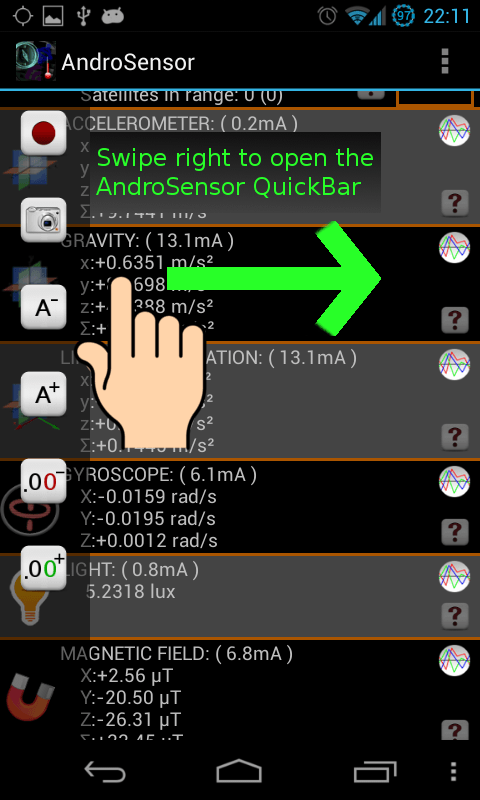
-Introducing the AndroSensor Quickbar for quick access to certain features. Swipe right to open the Quickbar, swipe left to hide it (available in "Main" and "Device Info" screens)
-Linear acceleration and gravity sensors implemented
-Better Italian translation (thanks to Andrea)
-Orientation sensor re-implemented, it always works
-Allows data recording via a foreground service.
-Ability to save setting to/from file.
-GPS update speed change from settings
-Can change number of decimal points
-Add new field DATE to sensor record
-GPS NMEA $GPGGA data
-Added unit degrees/sec for Gyroscope
-Added locked GPS sats
-More fixes and minor additions
v1.9.4.4a (Jul 3, 2012) :
- Fixed a force close that occured on some devices when pressing `record`. Apologies for the inconvenience, thanks for reporting.
v1.9.4.4 (Jun 29, 2012) :
- New sensor: Relative Humidity
- Added two extra precision digits for longitude and latitude
- Extended the available record interval values from 0.05 to 120 seconds
- Added GPS bearing in location
- Added a small graph button/indicator in the sensor fields that have graphs available. You may still use the big sensor icon in the left to turn graphs on/off
- Fixed UI flickering for certain ICS devices - lighter UI with same look
- Minor bugfixes and translation corrections.
Thanks!
v1.9.4.3 (Apr 20, 2012) :
- Added help buttons on the right side of each sensor field. Tapping on a help button shows a help text that explains each sensor. Help buttons may be hidden from settings. Texts are currently only available in English.
- Added Polish translation thanks to Jacek.
- Fixed a bug that caused data recording to stop in certain occassions.
- Changed record interval limits. Added -/+ buttons.
- Orientation fix for certain ICS custom ROMs.
Thanks!
v1.9.4.2 (Feb 26, 2012) :
- Added Swedish, Turkish, Korean and Czech translations thanks to Krister Knutars, Emre, Gyoohwan Ko and Petr respectively.
- Recording data has no software limit any more. You may record data for hours.
- Pressing back button while recording throws an alert instead of closing the app. If recording gets interrupted, data collected so far is saved and not lost.
- A couple more bugfixes.
v1.9.4.1 (Jan 14, 2012) :
- Various bugfixes. Thank you all for reporting any kind of issues.
v1.9.4 (Jan 6, 2012) :
- Added Dutch translation thanks to Mathias.
- Fixed compass when changing rotating device (the fix works in android 2.2 and higher).
- Sensor data recording writes down only the selected sensors as expected when changing active sensors from settings.
- Users that have the app before 1.9.2 must uninstall and reinstall. A popup appears to let you know, instead of FCing.
- A couple minor bugfixes.
v1.9.3 (Dec 22, 2011) :
- Better support for Android 4.0+ ICS
- The LogView has been removed from AndroSensor's default package, along with the much commented READ_LOGS permission. If you still want AndroSensor's Log collector search the market for "AndroSensor Log".
- Better compass accuracy for Gingerbread and above.
- Removed compatibility hacks for legacy devices running android 1.6.
v1.9.2 (Dec 4, 2011) :
- Fixed graph scaling and show actual values below graph.
- An AndroSensor directory is created in external storage to save files created by AndroSensor.
- Corrections for Romanian and German translations. Special thanks to Matei and Goetz respectively.
v1.9.1 (Nov 5, 2011) :
- Added Chinese translation thanks to the Ndoo team. Also corrected a few minor translation errors in italian.
- Extra debug output in system logs.
- New Admob SDK.
v1.9 (Oct 24, 2011) :
- Finally added graphs (beta). Just press the sensor icon to switch from text to graph view. Graphs are available only for the icons that have a thin orange line in the left.
- Added Romanian translation thanks to Vlad.
- Display totals for accelerometer and magnetic field.
v1.8.3 (Sep 21, 2011) :
- Fixed an FC / freeze that occured on some devices. Thanks for reporting and apologies for the inconvenience.
- Added Portuguese translation thanks to Jorge.
- Added an option to lock orientation of the app.
v1.8.2 (Sep 10, 2011) :
- Added google altitude. If location is obtained by network and altutude is not available, google's API returns altitude of your location based on longitude and latitude.
- Added number of satellites used for the fix.
- Fixed MapView follow mode issue.
- Minor performance and bugfixes.
v1.8.1 (Aug 19, 2011) :
- Samsung Epic users should be able to use AndroSensor again. Thanks for the feedback.. apologies for the inconvenience.
- Added option for rows/columns format of CSV file.
- Mapview has a default "follow" mode when you're moving. Follow mode deactivates if you scroll the map with your finger and reactivates if you click MENU->Location.
- Few display and translation fixes.
- Donate version via Handster is now a key. It removes ads from all versions of AndroSensor starting from v1.8.1 and you still get the updates via the Android Market!
v1.8a (Aug 9, 2011) :
- Added Hungarian translation (thanks to Bela) and German translation (bitte nicht streng sein!).
- Added multitouch test in device info.
- Added the option to record sensor values overtime and export to CSV.
- Added checkbox in Settings to limit the size of the email when sending log, in case it fails otherwise. The log file is now sent as a file attachment instead of plain text.
v1.7.5 (Jul 31, 2011) :
- Added French translation (thanks to Jean-Baptiste)
- Added list option in "Settings" to select which sensors are activated.
- Attempt to retrieve an error for sensors that exist on hardware but are not supported by software (mostly for temperature sensor) instead of always "Waiting for event". This does not always succeed, but can give a good hint.
- Attempt for finally fixing cpu cores bug that still exists in the Atrix and Droidx2. Apologies about that... Hopefully it's the last fix. Please provide some feedback on this. Thanks!
v1.7.4 (Jul 28, 2011) :
- Added pressure sensor (barometer) support. Special thanks to Johnny for his help.
- Wifi section is not totally empty when not connected to a network. No wifi scan is added since it's not like Androsensor. Androsensor only observes, never intervenes :) .
- Yet another fix for cpu cores bug that remained for a few devices.
- New admob SDK.
- A few minor bugfixes. Thank you all for reporting!
v1.7.3.1 (Jul 18, 2011) :
Fixed cpu cores bug. Sorry about that :)
v1.7.3 (Jul 17, 2011) :
- Added Spanish translation (thanks to Mike)
- Fix mobile signal strength on CDMA networks and wifi signal.
- CPU speed is diplayed in real time along with min and max values. Also added number of CPU cores.
- Bigger ads for tablets.
- There where complaints that app didn't close property on certain devices running 2.3.4. So I added an exit option in main screen option menu to kill the app (press MENU).
- Created a simple Androsensor website. The website includes explanations about the sensors.
v1.7.2 (Jun 29, 2011) :
- Added Russian translation (thanks to Andrey)
- Added WiFi info in "Device info" view. (That's why the new permission is required)
- Language defaults in system locale (if default language is supported).
- Snapshot button is also enabled for the "Device Info".
- Fixed a random FC on MapView.
- Little performance tweaking.